
Ditch That Stone-Age Radio: The Ultimate 12.1" Tesla-Style Upgrade for Your 2008-2014 Ford F150 Raptor
TL;DR: Stop Living in 2008.
Your F150 P415 is a beast, but that factory head unit is a fossil. We’re talking about swapping that cramped, button-heavy dash for a massive 12.1-inch vertical powerhouse. It brings Wireless CarPlay, Android 13, and modern GPS to your Raptor without losing your steering wheel controls or factory amp. It’s not just a screen; it’s a brain transplant for your truck.
The Problem: Why Your Interior Feels "Old"
Listen, I’ve seen it a thousand times. You’ve got a 2012 Raptor with a suspension that can handle the Baja 1000, but a dashboard that looks like a calculator from the 90s. The factory SYNC system is laggy, the maps are outdated, and trying to connect your phone via Bluetooth feels like a game of Russian Roulette.
Trust me, here is the deal: Most guys try to fix this by buying a cheap $150 unit from a random marketplace. Big mistake. As my experience shows, those low-end units use 2GB of RAM and bottom-tier chips. Two months in, the screen starts flickering, the GPS gets lost in the desert, and the system overheats the moment you turn on the AC. You don't want a "tablet glued to a dash"—you want an integrated solution.
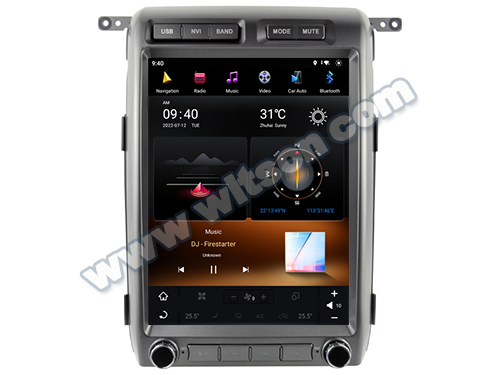
[Illustration: The 12.1" Vertical Powerhouse installed in a Raptor dash]
The Solution: The Witson High-Performance 12.1" System
This is where the Witson 12.1" Tesla-Style Android Multimedia Player comes in. This isn't just a screen; it’s a specifically engineered kit for the P415 chassis.
8-Core CPU & 4G/8GB RAM: No more "loading" icons. This thing is snappy, even when running Google Maps and Spotify simultaneously.
QLED Vertical Display: With a 1024x768 resolution, the colors pop even in direct sunlight. Perfect for those open-top desert runs.
Wireless CarPlay & Android Auto: Your phone stays in your pocket. The moment you start the truck, your apps are on the 12-inch glass.
Full OEM Integration: It keeps your Steering Wheel Controls (SWC) and talks to your factory amplifier. No buzzing, no static, just pure sound.
Spec Check: Standard vs. High-Performance
| Feature | Generic "Cheap" Unit | Witson High-Spec |
|---|---|---|
| Processor | 4-Core (Slow) | 8-Core (Snapdragon Grade) |
| RAM/ROM | 1GB / 2GB | 4GB / 8GB Options |
| Screen Type | TFT / TN (Washy) | QLED (Anti-Glare) |
| CarPlay | Wired Only/Dongle | Built-in Wireless |
Installation: True Plug-and-Play
I know what you're thinking: "I don't want to cut my factory wires." Listen, you don't have to. This kit is designed for the 2008-2014 Ford F150. It uses a specific harness that snaps directly into your OEM plugs.
[Illustration: what car fitful]
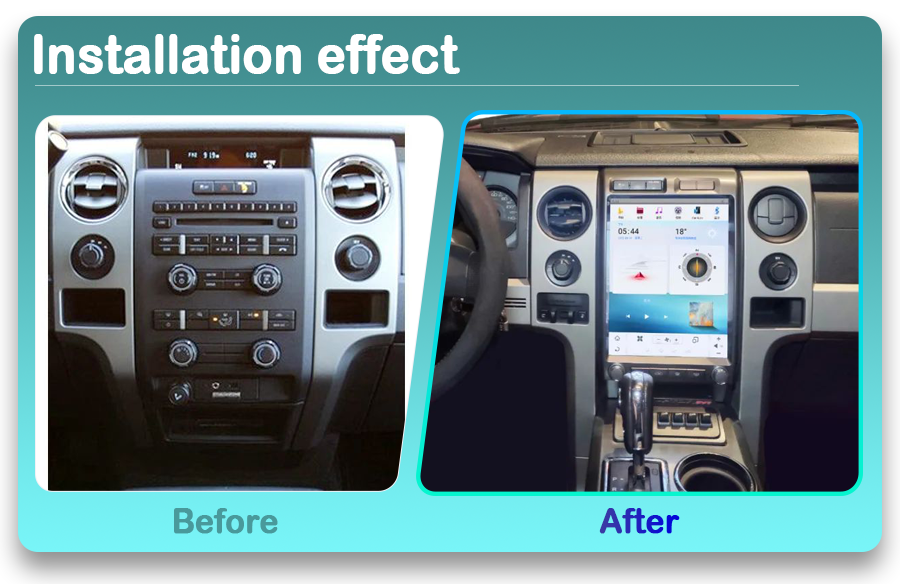
The Wiring Harness: No splicing required.
Expert Tip: Whether you have the basic XL trim or the luxury Raptor with the Sony sound system, this unit supports the CANBUS communication, meaning your door alerts, AC controls, and reverse camera will still work.
Buyer Checklist: Don’t Get Scammed
When shopping for a Ford F150 vertical screen, use this checklist to ensure you’re getting a professional-grade unit:
✅ Check the RAM: Never go below 4GB if you want to run modern apps.
✅ Cooling: Does it have an aluminum heat sink or a cooling fan? (Witson does).
✅ Version: Ensure it is Android 12 or 13. Don't buy old Android 10 stock.
✅ Support: Does the seller provide a dedicated CANBUS box for the P415?
Frequently Asked Questions
Q: Will I lose my steering wheel controls?
A: Nope. As long as you use the provided CANBUS decoder, your volume, skip, and voice buttons work just like they did from the factory.
Q: Does it support both iPhone and Android?
A: Absolutely. It features built-in Wireless CarPlay for iPhone users and Wireless/Wired Android Auto for Samsung/Pixel users.
Q: How hard is the installation for a 2013 Raptor?
A: If you can use a screwdriver and a plastic trim tool, you can do this in about 45 minutes. It’s a 100% bolt-in replacement for the original center stack.
