Home  > Blog & News
Blog & News
Current column:
Your Step-by-Step SAAB 9-3 Car Stereo Upgrade Guide (TAS/TB/TC/TVS/TFS8350)
time:2025-11-25view:560author:

Your Step-by-Step SAAB 9-3 Car Stereo Upgrade Guide

1.jpg

TL;DR

Upgrading your SAAB 9-3 car stereo is a rewarding DIY project that brings modern features like Apple CarPlay, Android Auto, and Bluetooth to your dashboard. Success hinges on getting the right parts: a model-specific dash kit for a single or double-DIN unit, a CAN-BUS wiring harness to integrate with the car's electronics, and an adapter to retain your steering wheel controls.

Understanding Your SAAB 9-3's Stock Audio System

Before you can upgrade, it’s essential to understand what you're working with. The audio system in SAAB 9-3 models (typically from 2003 to 2011) is more than just a radio; it's an integrated part of the car's electronics, often referred to as the Infotainment Control Module (ICM). This integration is why you can't simply swap it out like a traditional car stereo. The factory unit handles everything from music to warning chimes and system information, communicating with the car over a network called the CAN-BUS.

One of the biggest challenges, particularly in pre-2007 models, is the use of fiber optic cables for the audio signal, which connects the head unit to a factory amplifier (often located under the driver's seat). If your car has this system, you'll need specific adapters to bypass or integrate with it. Later models (2007+) generally use a more conventional copper wiring system, making the upgrade process more straightforward. Identifying your system is the first step to ensuring you buy the correct components.

So, is it worth upgrading? For most owners, the answer is a resounding yes. While the stock system has a clean, integrated look, it lacks the features we now consider standard. A modern head unit can completely transform your driving experience.

  • Superior Connectivity: Gain seamless Bluetooth for hands-free calls and audio streaming.

  • Modern Navigation: Use apps like Google Maps or Waze directly on your dashboard via Apple CarPlay or Android Auto.

  • Enhanced Audio Quality: Aftermarket units typically offer more power and advanced sound tuning options than the factory stereo.

  • App Integration: Access your favorite music and podcast apps like Spotify and Audible with a safe, intuitive interface.

Choosing the Right Aftermarket Head Unit and Components

Selecting the right parts is the most critical phase of your SAAB 9-3 car stereo upgrade. Your choice of head unit will define your new system's capabilities, while the correct installation accessories will ensure it works seamlessly with your car. The main choices for head units fall into three categories: single-DIN, double-DIN, and large-screen Android units.

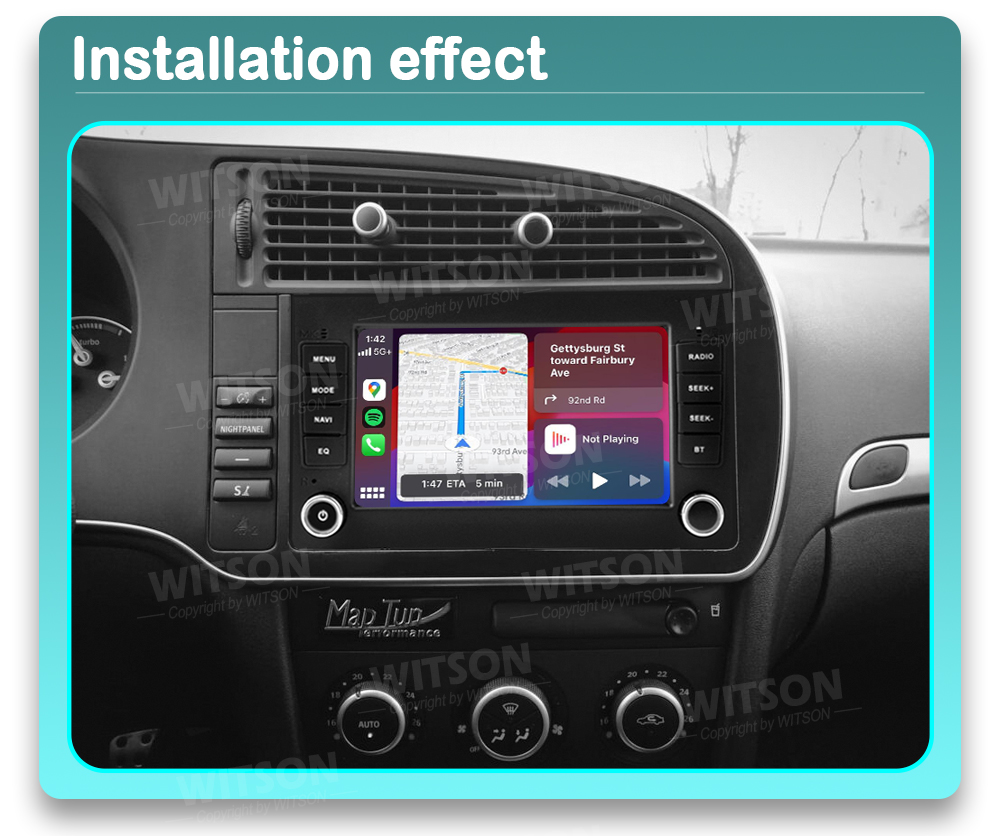
Single-DIN units are the traditional, smaller car stereo size, while double-DIN units are twice as tall, offering a larger screen for features like navigation and video. Large-screen Android units, often with a "floating" tablet-style display, have become incredibly popular for their versatility and app support. For those who prefer a seamless, factory-like appearance, options like the 7-inch OEM style multimedia stereo from WITSON are designed specifically for 2005-2008 models. These units often integrate well with the car's existing systems and aesthetics while providing modern features like GPS and Apple CarPlay.

Here's a quick comparison to help you decide:

Head Unit TypeKey FeaturesInstallation DifficultyTypical Cost
Single-DINCompact, often includes Bluetooth and USB. Some have small pop-out screens.Easiest$ - $$
Double-DINLarge touchscreen, Apple CarPlay/Android Auto, navigation.Moderate$$ - $$$
Android/Floating ScreenLargest screens, full Android OS, extensive app support, highly customizable.Moderate to Hard$$ - $$$$

Regardless of the head unit you choose, you will need a specific set of accessories to install it correctly. Don't try to cut corners here; using the right parts is the difference between a frustrating project and a clean, professional result. Here is your essential shopping list:

  • Head Unit: The single-DIN, double-DIN, or Android stereo of your choice.

  • Dash Kit / Fascia: A plastic trim piece that allows the new stereo to fit cleanly into your SAAB's dashboard. This is essential for a factory look.

  • Wiring Harness (CAN-BUS Adapter): This is the most important component. It connects your new stereo to the car's wiring without cutting any factory wires and translates the car's electronic signals (CAN-BUS) for the new unit. This retains features like warning chimes and power signals.

  • Antenna Adapter: Connects the European-style SAAB antenna plug to the standard plug on your new stereo.

  • Steering Wheel Control (SWC) Interface: Often included with the CAN-BUS harness, this module allows your factory steering wheel buttons to control the new stereo.

7.jpg

Your Step-by-Step SAAB 9-3 Stereo Installation Guide

With your new head unit and all the necessary components in hand, it's time for the installation. This process is very manageable for a DIYer with basic tools. Take your time, stay organized, and you'll have your new system running in no time. Don't be intimidated; it's a straightforward process if you follow the steps.

  1. Disconnect the Battery: Before starting any electrical work on your car, always disconnect the negative terminal of the battery as a safety precaution.

  2. Remove Dashboard Trim: Carefully remove the trim pieces around the climate controls and vents. Pro Tip: Use plastic pry tools to avoid scratching or cracking the dashboard plastics. The top vents usually need to be popped out to access the screws holding the factory stereo unit.

  3. Unscrew and Remove the Factory Unit: Once the trim is off, you'll see the screws securing the ICM/radio unit. Remove them and gently pull the entire assembly out of the dashboard. Disconnect the wiring harness and antenna cable from the back.

  4. Prepare the New Wiring Harness: This is best done on a workbench. Connect the wiring harness from your new stereo to the SAAB-specific CAN-BUS adapter harness. This typically involves matching wire colors and crimping or soldering them together for a secure connection. Follow the diagrams that came with your harness carefully.

  5. Install the New Dash Kit: Secure the new fascia or cage into the dashboard opening. This provides the mounting structure for your new single-DIN or double-DIN head unit.

  6. Connect and Test Everything: Before you mount the new stereo permanently, connect the main harness, the antenna adapter, and the SWC interface. If you have a microphone for calls or a GPS antenna, run those cables now. Briefly reconnect the car battery and turn the ignition on to test all functions: power, speaker output, steering wheel controls, and any other features.

  7. Mount the Head Unit and Reassemble: Once you've confirmed everything works, disconnect the battery again. Securely mount the new head unit into the dash kit. Carefully tuck the wires back into the dashboard, ensuring they aren't pinched. Reinstall the trim pieces and vents in the reverse order of removal.

  8. Final Check: Reconnect the battery for the last time. Power up your new stereo and enjoy the massive upgrade you've just given your SAAB!

A sequence of icons showing the main steps of a car stereo installation

Retaining Factory Features: Steering Wheel Controls and More

One of the biggest concerns when upgrading a modern car's stereo is losing factory functionality. Fortunately, with the right CAN-BUS interface, you can keep your convenient steering wheel controls (SWC) and other integrated features like the car's warning chimes. This interface acts as a translator, converting the digital signals from your SAAB's steering wheel buttons into a language your new aftermarket stereo can understand.

The SWC interface module is usually part of the main wiring harness adapter you purchase. It connects between the car's harness and your new stereo. Most aftermarket head units have dedicated input wires for this feature, often labeled "Key 1," "Key 2," or "SWC." You'll connect the output from the interface module to these wires as per the instructions.

Once wired, you'll need to program the buttons. This is typically done within the settings menu of your new head unit. The process is generally simple:

  1. Navigate to the "Steering Wheel Control" or "SWC Learning" section in your stereo's settings.

  2. Press a function on the screen (e.g., "Volume Up").

  3. Press and hold the corresponding button on your steering wheel until the head unit confirms it has learned the command.

  4. Repeat this process for all the buttons you wish to use.

By using the correct interface, you can successfully retain most, if not all, of the original button functions, ensuring a seamless and safe user experience. You can typically expect to keep control over:

  • Volume Up / Down

  • Track Forward / Back

  • Source Selection (e.g., switching from radio to Bluetooth)

  • Mute

Frequently Asked Questions

1. Is it worth upgrading a car audio system?

Absolutely. For most car owners, especially those with older vehicles like the SAAB 9-3, upgrading the factory sound system is one of the most impactful improvements you can make. It significantly enhances the driving experience by adding modern connectivity, superior sound quality, and access to navigation and media apps that factory systems lack.

2. Do I need a special kit for my SAAB 9-3?

Yes, you cannot install an aftermarket stereo without model-specific parts. A dedicated SAAB 9-3 dash kit is required for the unit to fit physically, and a CAN-BUS wiring harness is essential for it to function correctly with the car's electronics and retain features like steering wheel controls.

3. Can I install a double-DIN stereo in any SAAB 9-3?

For 2007 and newer models, installing a double-DIN unit is generally straightforward with the correct dash kit. However, pre-2007 models that came with a single-slot ICM and a separate CD player require more extensive dashboard modification to create the space for a double-DIN unit, making it a more advanced project.

4. Will I lose my car's warning chimes after the upgrade?

You shouldn't, as long as you use a high-quality CAN-BUS wiring harness. These adapters are designed to integrate with the car's system and will reproduce the factory warning chimes (for seatbelts, doors, etc.) through the car's speakers, ensuring you don't lose these important safety alerts.